
osm2pgsql on a Raspberry Pi
I love the Raspberry Pi! It's an affordable little box of "I can do it" Linux-goodness.
Though, some tasks are not quite as easy to get right on the Pi, and getting osm2pgsql to
run reliably on a
Raspberry Pi 3B
has been a challenge.
This post examines one limitation of the Raspberry Pi system, how this can make
osm2pgsql go horribly wrong, and how to configure the system to make it work.
If you are new to osm2pgsql, read my initial post first, I do not repeat the overall process here.
Raspberry Pi = Slow I/O
Update: Most of this complaint is resolved by using application class (A1 or A2) SD cards. The rest is resolved with the introduction of the Raspberry Pi 4.
The main storage of the Raspberry Pi is a micro SD card. While this is great from a cost and availability perspective, the performance of the best SD cards is sub-par for most relational database work. I mention this first, because even when working with more powerful hardware, including faster disks, the main limitation is disk I/O. This is even more of an issue on the Pi. In my previous post I warned:
Postgres and osm2pgsql both use a lot of disk I/O during this process!
PgOSM: Transform OpenStreetMap data in PostGIS
My previous post, Load OpenStreetMap data to PostGIS,
covered how to use osm2pgsql to load a sub-region export of OpenStreetMap data into PostGIS (PostgreSQL).
With the data loaded to Postgres, one quickly finds out that it isn't very easy to jump in and use right away.
To help solve this problem,
the PgOSM project was created.
The main purpose of PgOSM is to restructure the OpenStreetMap data into a more friendly format
for relational databases.
This post starts by showing how the PgOSM project is used to transform our OpenStreetMap data and ends with showing why we do it this way.
Load OpenStreetMap data to PostGIS
PostGIS rocks, and OpenStreetMap is Maptastic! One challenge I've had with this open source pair, though, has been getting a good, comprehensive set of OSM data into Postgres, on non-enterprise hardware. A few years ago I found Geofabrik's download server... a lifesaver! They offer logical regional exports of OpenStreetMap data, updated daily, distributed by a number of regional levels. The one I use the most is the U.S. state-level files, namely Colorado.
Once I had found this stellar data set (updated daily!) I wanted a way to easily get my own spatial database
regularly updated with Colorado. One of the commonly mentioned tools is
osm2pgsql.
The problem is, I was (and still am) trying to run processes on the smallest hardware possible and this
process is not exactly lightweight!
PostgreSQL + PostGIS + OpenStreetMap = 100% Open Source, GIS-filled database!
PostgreSQL at RustProof Labs: 2018 in Review
As I look back on 2018, I can say with great joy: I have spent a lot of time working with PostgreSQL this year! Postgres is my favorite open-source database, and I'm really excited to start digging into some of the new features and enhancements in PostgreSQL 11 and PostGIS 2.5.
This post is a quick snapshot of my Postgres activities in 2018 and some goals for 2019. For me, these activities fall into a three broad groups.
- Blog posts
- Projects built around PostgreSQL (open-source and internal)
- Other stuff
PostgreSQL popularity
PostgreSQL has continued to grow in popularity through 2018, a long running trend according to DB-Engine's ranking. Postgres is 4th on the list ahead of MongoDB (even before the news of The Guardian switching!) and behind Oracle, MySQL and MS SQL. Postgres and MongoDB are growing in popularity while all of the top 3 databases are apparently declining.
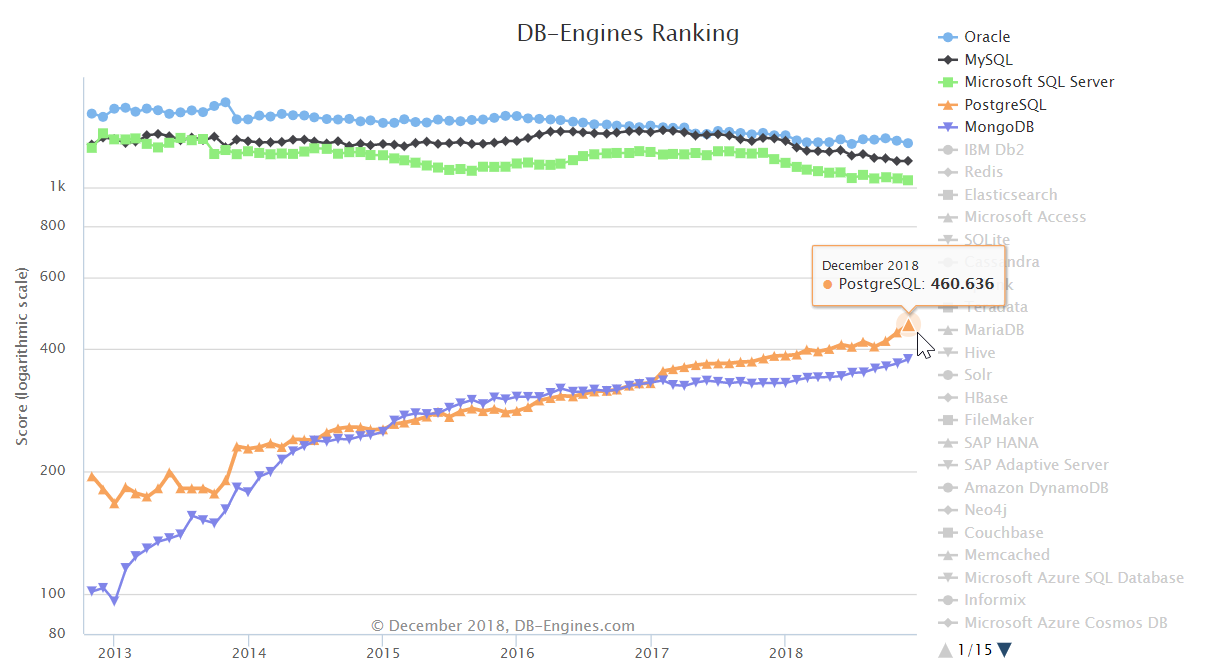
Yay, PostgreSQL!!
PostGIS: Tame your spatial data (Part 2)
In a previous post PostGIS: Tame your spatial data
I illustrated how large-area polygons in your spatial data can take up a lot of space.
That post examined one method (ST_Simplify) to reduce the size of the data (45% reduction of size on disk)
in order to improve performance (37% faster queries).
The goal of reductions like this are to improve the life of the analysts
working with spatial data for their job.
These analysts are often using spatial data within a GIS tool such as QGIS, and in
those tools Time-to-Render (TTR) is quite important.
The topic of that prior post solved a specific problem (large polygons), and unfortunately that solution can't be applied to all problems related to the size of spatial data.
This post is an advanced topic of the series PostgreSQL: From Idea to Database.
 Mastodon