
Local LLM with OpenWeb UI and Ollama
Like much of the world, I have been exploring capabilities and realities of LLMs and other generative tools for a while now. I am focused on using the technology with the framing of my technology-focused work, plus my other common scoping on data privacy and ethics. I want basic coding help (SQL, Python, Docker, PowerShell, DAX), ideation, writing boilerplate code, and leveraging existing procedures. Naturally, I want this available offline in a private and secure environment. I have been focused on running a local LLM with RAG capabilities and having control over what data goes where, and how it is used. Especially data about my conversations with the generative LLM.
This post collects my notes on what my expectations and goals are, and outlines the components I am using currently, and thoughts on my path forward.
Hardware
A dedicated GPU is a must. Without a GPU you're relegated to using significantly smaller models, with significantly reduced quality of outputs. In some cases the output quality wasn't all that poor, it was just that the wait for responses was long enough that the only quality I would have been happy with was perfect. And that's unrealistic!
Ollama and OpenWeb UI
Ollama allows you to download models and run them locally, 100% offline. Ollama provides the mechanism to manage models and provides basic interaction with them. Beyond basic use cases, we need to expand beyond Ollama itself. A few months ago I started a Python-based project to ingest project documentation and provide a RAG-informed LLM interface.
Luckily, a colleague of mine mentioned OpenWeb UI. I immediately became a fan and jettisoned my own efforts in favor of OpenWeb UI! The combination of Ollama plus OpenWeb UI hit all of my core requirements.
Pros:
- Runs locally, capable of 100% offline.
- Doesn't hemorrhage content or usage data off my device.
- Enables RAG via Knowledge functionality.
- Customizable via Python enabled tools, functions, and skills.
Caveats:
- Do not use Docker if you're on Mac Silicon (e.g. M* chip).
- Use Docker if you have a more traditional CPU/GPU combo.
- Computers without dedicated GPU limits model choices.
- Even with smaller models, performance can be painful
- Lower quality output makes waiting even worse.
Models
I manage the base models through the ollama cli interface. You can explore
the available options through their model library.
The base model I have been using most frequently is
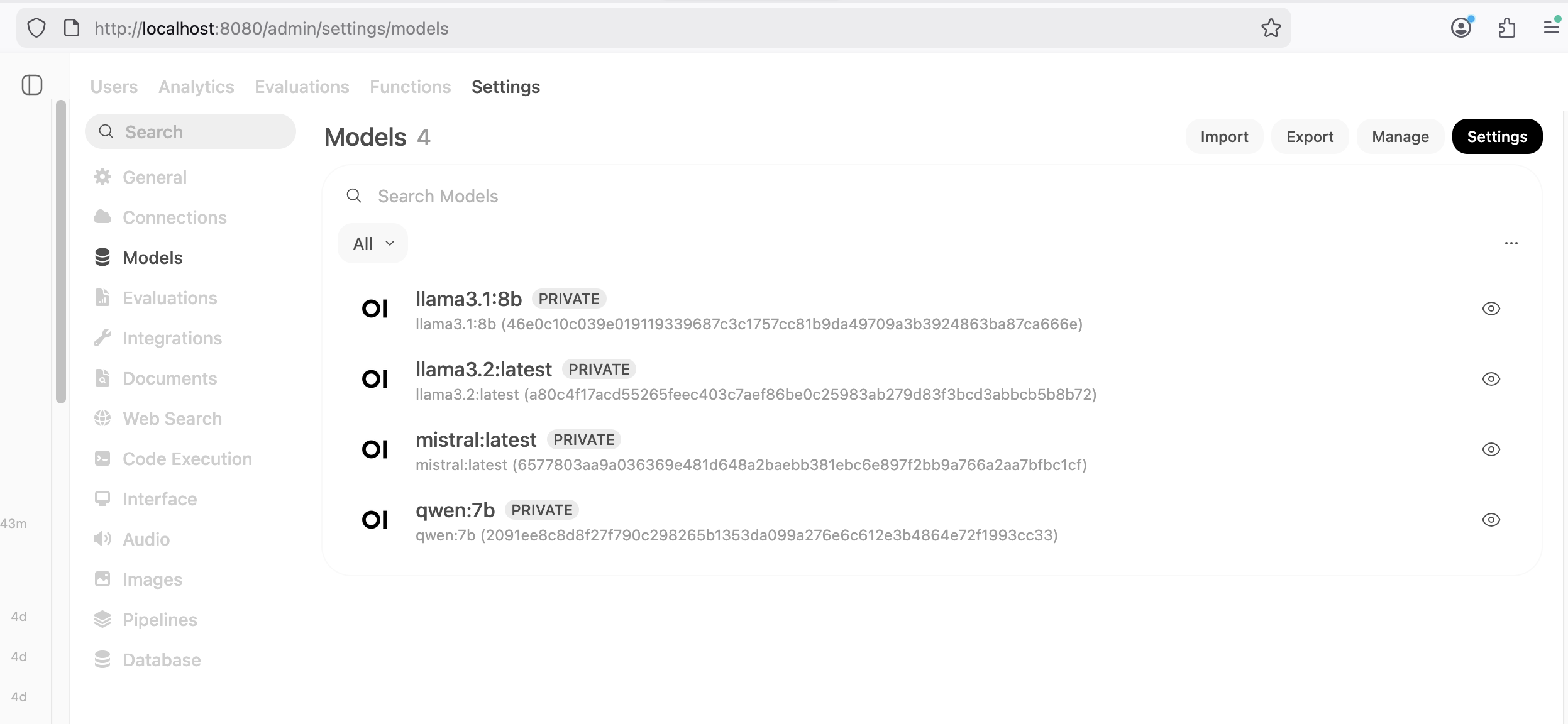
llama3.1:8b.
I have also had decent results with llama3.2:latest, mistral:latest, and qwen:7b.
I have not gotten back around to pitting models against each other or exploring new
options. Instead, I have been focused on making one model work for me as well as possible.
OpenWeb UI can easily connect to your ollama instance. Once connected, your models become available to OpenWeb UI. These can be managed via the Model tab of the Admin Settings as shown in the following screenshot.
The model choice is just the beginning of tuning OpenWeb UI.
Custom Workspace Models
In OpenWeb UI, the Workspace area allows you to create custom derivatives from the base models. These customized models become available as a choice in the chat interface. This allows users to easily apply custom system prompts to tune the model's behavior and output. I have a "Developer" model with the following system prompt, and the temperature turned down to 0.6 from the default of 0.8. Lower temperatures are less creative, more factual, and less likely to hallucinate.
"You are a senior developer experienced with Linux, Windows, PostgreSQL, MS SQL Server, Python, and automation best practices. You give solid technical advise including explanations about why you chose the methods suggested."
Another custom model I have experimented with is my "Fiction Writer." The following system prompt is defined and the temperature is increased from 0.8 to 1.0.
"You are a fiction story writer. Follow the basic Plot line referenced and add missing details like background, character details with motivations and dialog to move the plot forward. 500 - 1000 word output is ideal."
Functions
The one function I have started using is v4 of adaptive memory. Users can view, edit, and delete memories. The default configuration is to hold 200 memories. I bumped that to 500 memories because I'm curious to see what it collects for me. I have been intentionally having a wide range of random chats. Some are serious questions, others silly, and others still that are inspired by other suggested prompts for testing LLMs. An example of a memory made recently: "User has knowledge of OSM roads data and prefers to use PgOSM Flex."
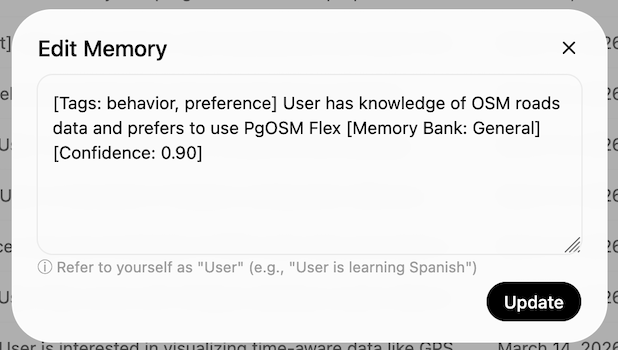
The UI calls out when it saves and retrieves memories, though the details of those actions aren't always clear if you are not paying attention to the memories as they happen. I have yet to decide if I think the way it uses memories is helpful yet or not, it's only been a couple weeks since I enabled this function.
Web search
Including web search integration is essential for questions involving quickly changing technology. This need for web search in our LLM tooling relates directly to the age of data included in the training data of many models. Web search also appears to be a pain point where it can quickly get expensive for API services. There are a few paths to using APIs for free, but the free runway ends quickly.
I ended up building my own quick solution
leveraging DuckDuckGo. I was originally using the duckduckgo-search module
that now redirects to this DDGS Python package
(Dux Distributed Global Search). The latest efforts in this module
reference a ddgs api functionality I haven't been able to get to work yet,
but it looks like I might be able to retire my own API module sooner instead of
later. 👍
Limited quality of RAG
The biggest limitation so far for me is the default functionality for RAG
through the Knowledge feature.
I haven't been all that satisfied with loading in more than small amounts of content as knowledge, for two reasons.
First, if I try to upload all of my blog content from the .md source files
through the browser, it barfs on the upload
after 20-40 files and just stops without a retry mechanism to resume where it left off.
I would investigate the
programmatic approach
if not for the next challenge.
Second, when I loaded a larger quantity of content with all the other default settings,
the quality of content served to the LLM was poor unless I was extremely explicit
in my prompts.
Further reading showed there are plenty of ways to customize how OpenWeb UI processes documents for RAG. The downside: each one involves something new in the stack to provide the additional processing. The one that caught my attention the most is LightRAG.
However. Do I want to go down the path of another completely new component?
Or, do I revisit my first path down this road
based approach based on Shaun Thomas' post
PG Phriday: A Dirty Postgres RAG?
I do love Postgres, and the Python + Postgres + pgvector work was the most
pleasant development / user experience for me. I had been trying to avoid
that approach to minimize the number of components involved, but if it's
Postgres versus LightRAG (or insert any of 100 other projects I am not
familiar with), I have my answer.
Summary
Ollama plus OpenWeb UI is working nicely for me on common coding tasks, such as mocking up a new bit of functionality and troubleshooting common errors. The quality is lower when the topic is more niche or recently released. Part of that lower quality is likely related to my roughly-patched-together search API.
A key element to this type of approach being more scalable will be when cloud providers offer GPU-enabled instances at a reasonable price. There currently are no entry-level options. The cheapest GPU-enabled instance through DigitalOcean is $0.76 / hour, or roughly $550 / month.
Need help with your PostgreSQL servers or databases? Contact us to start the conversation!
 Mastodon